
Notifications to broadcast: how to send them without spamming
Notifications reach people's phones, so they get noticed. Used well, they are a great way to say "the water drop is on at 8pm". Used too often, people switch them off.
Two kinds
- Community news - goes to phones that chose news. Never between 9pm and 7am: anything sent then waits until morning.
- Emergency - straight away, at high priority. See Emergency Notifications.
Send community news
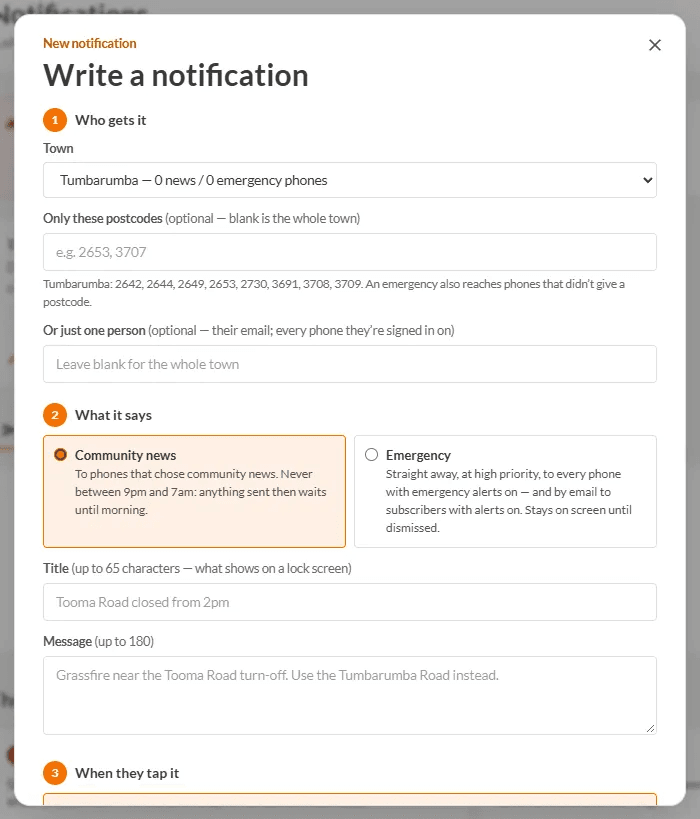
- Open Admin → Notifications and press Write one.
- Pick the Town. Add postcodes if only part of town needs it.
- Choose Community news, then a Title and Message.
- Choose When they tap it, for example an event or a listing, so the message goes somewhere useful.
- Choose Now or Later.
- Check the preview and press Send it.
See how it went

- Sent & scheduled - what went out, how many phones took it, open rate, and anything you can still cancel.
- Who's subscribed - every phone with notifications on, with a Send test button for each.
- Phone problems - people who could not turn notifications on, and why.
Use Test a phone to try one on yourself first: it is titled [TEST] and nobody else sees it.
Avoiding spam
- Send only what most people in town would want to know.
- Aim for no more than one or two a week. Combine a few small things into one.
- Write a clear title that makes sense on a lock screen.
- Keep emergency alerts for emergencies.
- Use postcodes so a message about one end of town does not go to the other.
Only community admins can send notifications for their own towns. Approvers cannot. Every send is kept with the sender's name.
TODO (client): Confirm the 'no more than one or two a week' guidance with the client, and whether to give any admin-facing limit in the product.