
Display screen: a live What's On for a TV
The display screen is a full-screen page for a TV in a pub, shop, visitor centre or club. It steps through the Directory, What's On and Gallery on its own, with a QR code people can scan to open the site on their phone. Nobody needs to touch it.
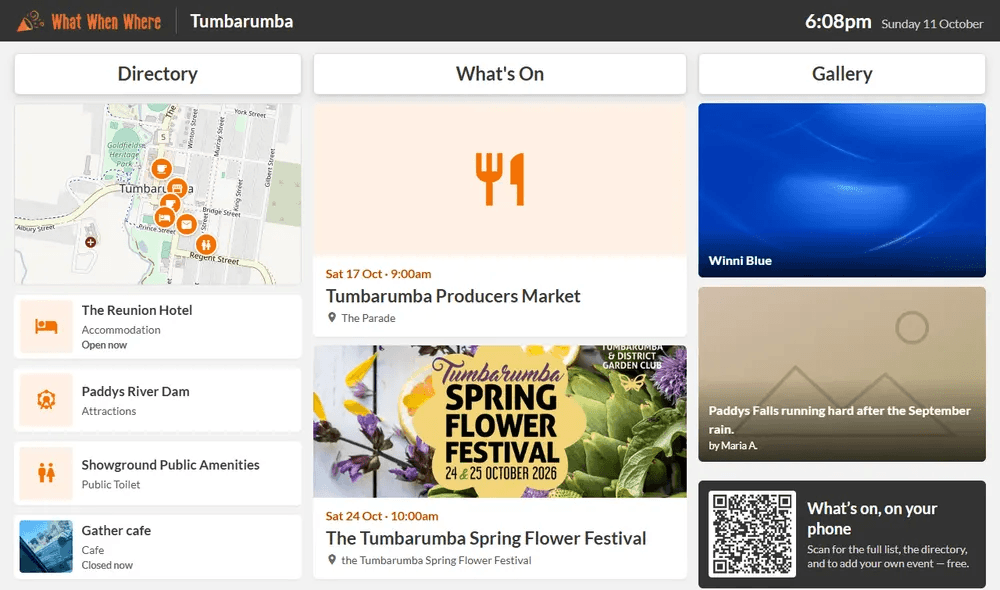
Every town already has one
There is nothing to set up. Point the TV's web browser at:
https://whatwhenwhere.com.au/community/your-town
(for example /community/tumbarumba). It shows the town's clock, the next events, nearby listings and photos.
TODO (client): Confirm the final production address that venues should use (whatwhenwhere.com.au, or the older whatwhenwhere.info which is also in use).
How it behaves
- It refreshes its content every five minutes. If the internet drops, it keeps showing what it had.
- Events disappear the moment they finish.
- Once a day it reloads itself, so a TV left on for months still gets updates.
- It works at 1080p and 4K.
Different settings (admins)
If a TV needs something different, an admin creates a TV screen in Admin → Widgets & screens. You can:
- Show or hide the Directory, What's On and Gallery columns, and set how many seconds each takes to move on.
- Show What's On in a mixed order or soonest first.
- Turn the map and the QR code on or off.
- Choose how many days ahead to show.
Each screen gets its own address. The list also shows Last seen, so you can spot a TV that has gone offline: it turns red when a screen has not checked in for a couple of hours.
Set up the TV
See the guides for Fire TV Stick, Android TV and Chromecast. For any other TV with a web browser, open the address above in the browser and set it as the home page.