
As a community admin: create listings for your town (amenities, sights, attractions)
As a community admin you can add things to the Directory yourself, and edit anything in your town, without waiting for someone to send them in. This is the best way to put in the public things that no business will list: toilets, parks, playgrounds, the post office, sights and attractions.
Add one
- Sign in and open Admin → Businesses.
- Press Add a listing.
- On Find it, press Type it in myself (or look it up on Google if that is switched on).
- Add the Name, Address, a Description and the categories: for example Public Toilet, Park, Post Office, Attractions, Bank or ATM.
- For things that are always open or have no hours, tick I'd rather not list opening hours.
- Check, then save.
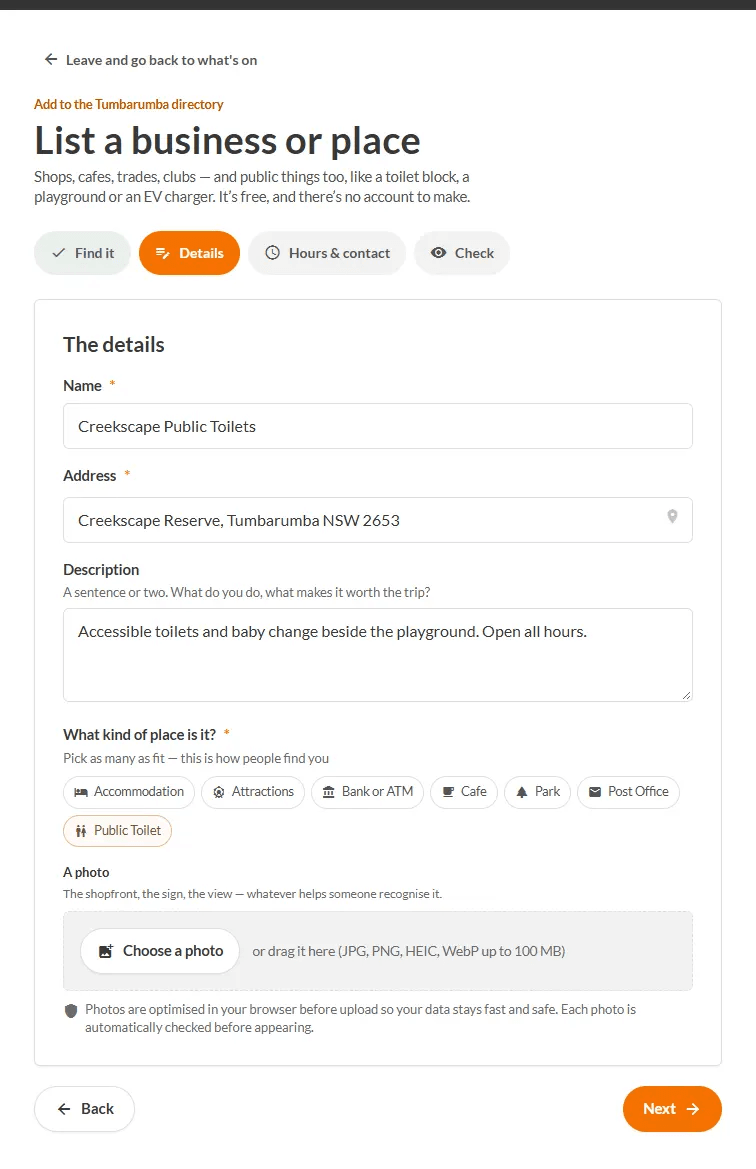
Edit or fix a listing
- In Admin → Businesses, open the listing and press Edit the details.
- Press Save changes (you do not have to click through every step).

Amenities are not a separate kind of thing: they are listings in a category such as Public Toilet.
TODO (client): Confirm whether admin-added listings go live immediately or still show in the Needs review queue, and describe the admin 'Add a listing' flow with its own screenshots.